Home security camera offline: what to do?
When your security camera goes offline, quick troubleshooting can restore it. Follow these steps to diagnose and fix common issues safely.
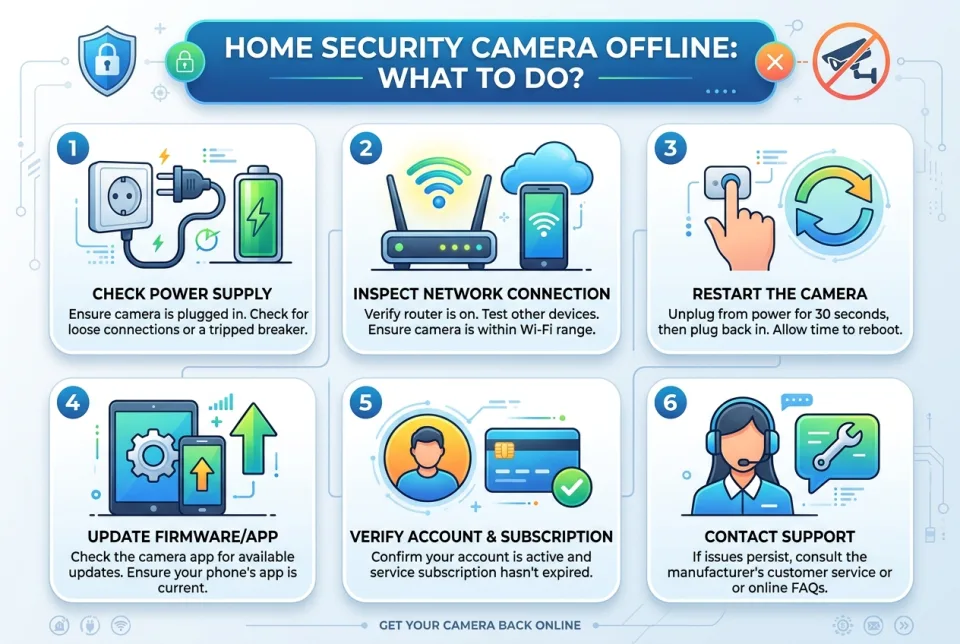
Quick answer
5 steps — read this before anything else
-
1
Check the camera's power source and connections.
-
2
Verify your Wi-Fi network is working and the camera is in range.
-
3
Restart the camera and your router.
-
4
Open the camera app to check for status updates or errors.
-
5
If the camera remains offline, contact the manufacturer's support.
Warning
If you suspect a break-in or immediate danger, call local emergency services first. Do not delay calling for help to troubleshoot your camera.
Discovering that your home security camera is offline can be unsettling. Whether you use it for peace of mind or to monitor your property, a non-functioning camera demands prompt attention. This guide walks you through safe, practical steps to diagnose and resolve common causes of an offline camera.
What is happening?
An offline camera means it cannot communicate with your home network or the cloud service. This could be due to a power interruption, network issue, app glitch, or hardware fault. The camera may still be recording locally, but remote access is unavailable.
Emergency warning
If you suspect a break-in or immediate danger, call local emergency services first. Do not delay calling for help to troubleshoot your camera. Your safety is the top priority.
What to do first
- Check the power. Ensure the camera is plugged in securely and the outlet has power. For battery-powered cameras, check the battery level and charge if needed.
- Verify your internet connection. Confirm that other devices in your home can access the internet. If your Wi-Fi is down, restart your router and modem.
- Restart the camera. Unplug the camera or use the power button to turn it off, wait 30 seconds, then turn it back on.
- Open the camera app. Check for any error messages or status indicators. Some apps provide troubleshooting tips or a signal strength reading.
- Check Wi-Fi signal strength. If the camera is far from your router, the signal may be weak. Consider moving the router or adding a Wi-Fi extender.
What NOT to do
- Do not ignore the offline status. A persistent offline camera could indicate a technical problem or tampering.
- Do not reset the camera to factory settings unless instructed by support; you may lose important settings.
- Do not attempt electrical repairs if you are not qualified. Water and electricity are dangerous; keep the camera away from moisture.
- Do not use unsecured networks to reconnect your camera; always use a password-protected Wi-Fi network.
When to call for help
If you have followed the steps above and the camera remains offline, contact the manufacturer's customer support. If you believe the camera was deliberately disabled or you notice signs of intrusion, contact local law enforcement immediately.
What to monitor
After restoring the camera, monitor its status for a few hours to ensure it stays online. Check the app for any recurring errors. Also, review footage if available to see if the outage coincided with any suspicious activity.
How to prevent it
- Keep firmware updated. Install updates promptly to fix bugs and improve security.
- Use a UPS or battery backup for your router and camera to handle short power outages.
- Regularly test your cameras and check app notifications for offline alerts.
- Secure your Wi-Fi network with a strong password and modern encryption (WPA2 or WPA3).
By following these steps, you can often resolve an offline camera quickly. If problems persist, professional support is your next step. Stay safe and proactive about your home security.
Spotted an error? Report it — we correct factual mistakes promptly.
Read next
Carbon monoxide detector alarm: what to do?
If your carbon monoxide detector sounds, treat it as an emergency: get everyone outside to fresh air and call for help. Learn the steps to take and mistakes to avoid.
Gasoline smell in the garage: what to do?
A strong gasoline smell in your garage is a fire and health hazard. Act quickly to eliminate ignition sources, ventilate, and find the source.
Bed bugs suspected at home: what to do?
If you think you have bed bugs, act quickly to confirm the problem and prevent them from spreading. Learn the safe steps to take and what to avoid.
BBQ gas canister safety checks: what to do?
A step-by-step guide to safely checking your BBQ gas canister and connections, including leak testing and what to do if you smell gas.
Related handy tools
Checklists, decision guides, scenarios and quizzes for the same situation.