How to test and replace a smoke alarm battery
Regular testing and timely battery replacement keep your smoke alarm working. Learn how to test your alarm and replace the battery safely.
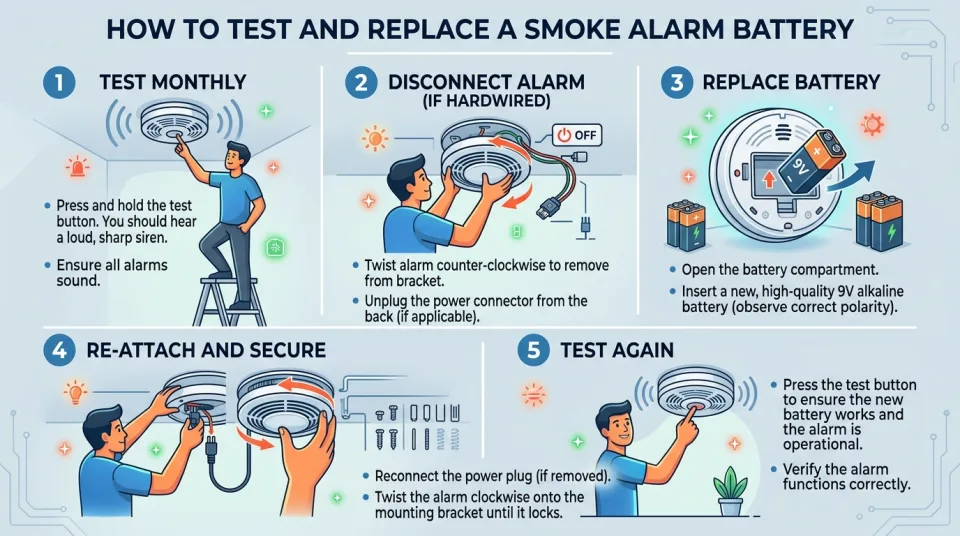
Quick answer
5 steps — read this before anything else
-
1
Press and hold the test button until the alarm sounds.
-
2
If it doesn't sound, replace the battery immediately.
-
3
Turn off power at the breaker before removing the alarm (if hardwired).
-
4
Replace the battery with the type specified by the manufacturer.
-
5
Test the alarm again after replacing the battery.
Warning
Never disable a smoke alarm by removing its battery. A disabled alarm cannot warn you of a fire.
Smoke alarms save lives, but only if they work. Testing your alarm monthly and replacing the battery when needed are simple tasks that take just a few minutes. This guide explains how to test your smoke alarm and replace its battery safely.
How to test your smoke alarm
- Press the test button. Stand a safe distance away and press and hold the test button until the alarm sounds. This may take a few seconds.
- Listen for the alarm. The sound should be loud and clear. If it is weak or absent, the battery may be low or the alarm may be faulty.
- Check the battery type. Most smoke alarms use a 9-volt battery, but some use AA or other sizes. Check the manufacturer's instructions or the label inside the battery compartment.
How to replace the battery
- Turn off power (for hardwired alarms). If your alarm is connected to your home's electrical system, turn off the power at the circuit breaker before removing the alarm from its base.
- Remove the alarm from its base. Twist or slide the alarm off its mounting bracket as instructed by the manufacturer.
- Open the battery compartment. This may be a door or a cover that slides or flips open.
- Remove the old battery. Note the orientation (which way the positive and negative terminals face).
- Insert the new battery. Match the polarity markings (+ and -) on the battery and the compartment. Push the battery in firmly.
- Close the compartment and reattach the alarm. Make sure it clicks securely into place.
- Restore power (if applicable). Turn the breaker back on.
- Test the alarm again. Press the test button to confirm the new battery is working.
What NOT to do
- Do not remove the battery to silence a false alarm. Use the hush button if available, or open a window. Never disable a smoke alarm permanently.
- Do not use rechargeable batteries unless the manufacturer explicitly allows them. They may not provide enough power for the alarm.
- Do not force the battery. If it doesn't fit easily, check the orientation and the battery type.
- Do not ignore a chirping alarm. A chirp usually means the battery is low and needs replacing immediately.
When to replace the smoke alarm itself
Smoke alarms have a limited lifespan. Most need to be replaced every 10 years, or sooner if they fail to respond to testing. Check the manufacturer's date on the back of the alarm. If the alarm is older than 10 years, replace the entire unit.
How to prevent smoke alarm failures
- Test your alarms monthly.
- Replace batteries at least once a year, or when the alarm chirps.
- Keep the alarm clean by gently vacuuming the exterior to remove dust and cobwebs.
- Never paint over a smoke alarm.
Regular testing and battery replacement are quick tasks that ensure your smoke alarm is ready to protect you and your family. Make it a habit to test your alarms on the first day of each month.
Spotted an error? Report it — we correct factual mistakes promptly.
Read next
What to Do When Your Device Takes Too Long to Charge
Learn why your phone, tablet, or electronic device is charging slowly and how to safely troubleshoot cables, ports, power sources, and battery performance.
What to Do If Your Device Has Long Charging Times
If your smartphone, tablet, or laptop is taking unusually long to charge, follow these troubleshooting steps to identify damaged accessories, dirty ports, or battery health issues.
Bed bugs suspected at home: what to do?
If you think you have bed bugs, act quickly to confirm the problem and prevent them from spreading. Learn the safe steps to take and what to avoid.
Bad smell coming from bathroom drains: what to do?
A foul odor from bathroom drains is usually caused by a dry trap, buildup, or a blocked vent. Learn safe steps to find and fix the problem.
Related handy tools
Checklists, decision guides, scenarios and quizzes for the same situation.