Thermostat not responding: what to do?
A thermostat that will not respond is usually a power, battery or settings problem. Work through the simple checks before calling a technician.
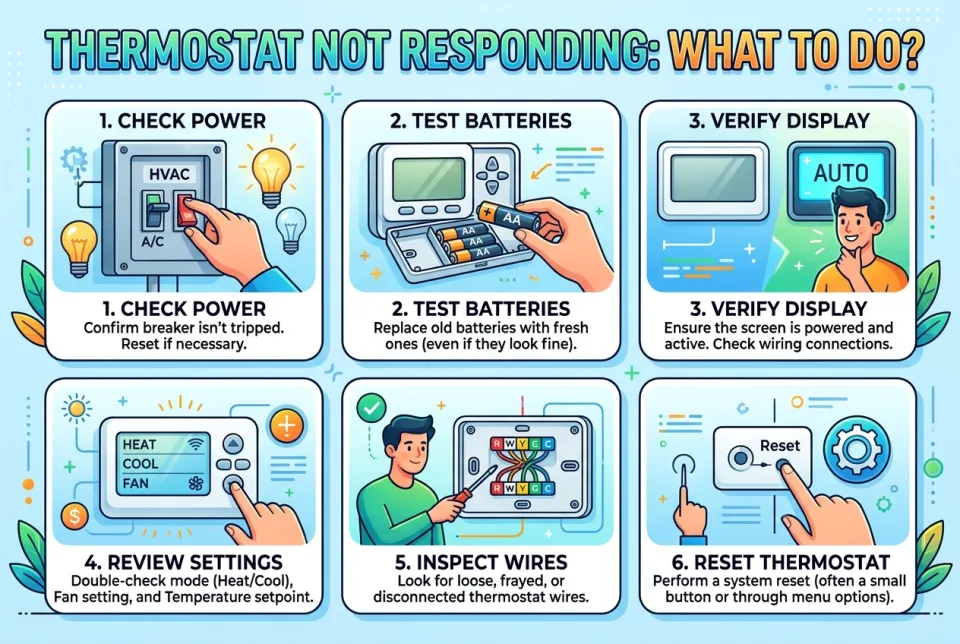
Quick answer
5 steps — read this before anything else
-
1
Check the thermostat display: a blank or dim screen usually means dead batteries or a tripped breaker.
-
2
Replace the batteries if your model uses them, then reset the thermostat.
-
3
Turn the furnace or air handler off and on at its service switch, and check the breaker panel.
-
4
Confirm the thermostat is set to Heat or Cool, not Off or Fan only, and the setpoint is past the room temperature.
-
5
If it still will not respond, call a qualified HVAC technician.
Warning
If you smell burning, see smoke, scorch marks or sparks, or the breaker trips repeatedly, stop and call your local emergency services or a qualified technician. Do not keep resetting the breaker.
A thermostat that will not respond can be frustrating, especially in extreme heat or cold. Most of the time the cause is simple: dead batteries, a tripped breaker, a loose wire or a setting that was changed by accident. Work through the checks below in order before assuming the unit itself has failed.
What is happening
The thermostat is a low-voltage control that tells your heating or cooling equipment when to run. If it has no power, a blank screen or no response to button presses, the equipment will not receive a signal. This can be a thermostat problem, a power problem at the furnace or air handler, or a wiring issue.
What to do first
- Look at the display. A blank or very dim screen points to a power problem. If the screen is on but buttons do nothing, the thermostat may be locked or frozen.
- Replace the batteries if your model uses them (many battery-powered and some smart thermostats do). Use fresh batteries of the correct type and check the display again.
- Reset the thermostat. Many models have a reset button, or you can reset through the menu. A smart thermostat can often be power-cycled by removing it from its base plate for about 30 seconds, following the manufacturer's instructions.
- Check the power at the equipment. Find the service switch near the furnace or air handler and turn it off, then on. Check your home's breaker panel for a tripped breaker and reset it once.
- Confirm the settings. Make sure the mode is Heat or Cool, not Off or Fan only, and that the setpoint is clearly above (heating) or below (cooling) the current room temperature. Check any schedule or hold setting that may be overriding you.
What NOT to do
- Do not open the thermostat or the furnace panel and start rewiring unless you are trained and the power is off. Low-voltage wiring is safe to touch in most cases, but line-voltage components are not.
- Do not keep resetting a breaker that trips again. A breaker that will not stay on is a sign of a fault and needs a professional.
- Do not force buttons or pry off a smart thermostat in a way the manufacturer does not describe.
- Do not ignore a burning smell, scorch marks, buzzing or sparking. Those are emergency signs, not a reset problem.
When to call for help
Call a qualified HVAC technician if the thermostat still does not respond after new batteries, a reset and a power check, if the display is on but the equipment never starts, if you see damaged or loose wires, or if the breaker trips repeatedly. In very hot or very cold weather, do not wait long, especially if anyone in the home is elderly, very young or unwell.
What to monitor
After you get it working, watch for the same problem returning. Repeated battery drain, a thermostat that loses its settings, or a unit that short-cycles can point to a deeper issue worth having checked.
How to prevent it
Replace thermostat batteries on a schedule, keep the thermostat clear of direct sunlight, drafts and heat-producing appliances, and change your air filter regularly so the system is not working against a blocked airflow.
Start with the display and the batteries, then check power at the equipment. If those simple steps do not fix it, stop and call a technician rather than opening panels yourself.
Sources & references
Spotted an error? Report it — we correct factual mistakes promptly.
Read next
Water heater no hot water: what to do?
When your water heater stops making hot water, follow these steps to diagnose the problem safely. Learn when to call a professional and how to avoid dangerous mistakes.
Washing machine shakes violently on spin: what to do?
A washing machine that shakes violently during the spin cycle can damage the appliance or your floor. Learn the common causes and safe steps to fix them.
Ceiling fan wobbling or noisy: what to do?
A wobbling or noisy ceiling fan is usually fixable with simple adjustments. Learn safe steps to diagnose and correct the problem before it worsens.
Electric kettle stopped working: what to do?
When your electric kettle stops working, follow these safe troubleshooting steps. Learn how to check power, inspect for damage, and decide when to replace it.
Related handy tools
Checklists, decision guides, scenarios and quizzes for the same situation.