Ransomware screen appears: what to do?
A ransomware screen is a serious security incident. Stay calm, isolate the device, and follow these steps to limit damage and recover safely.
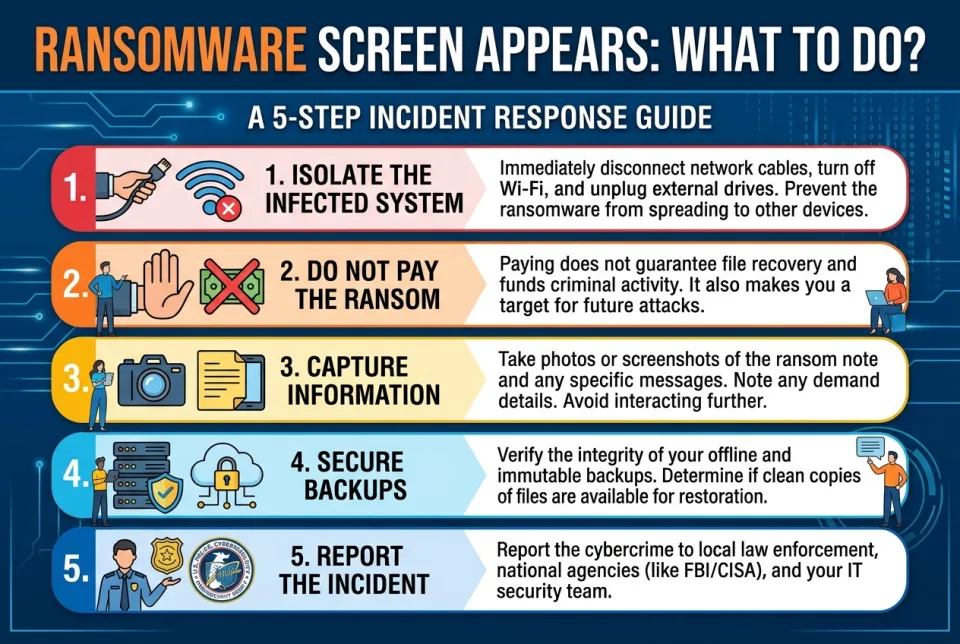
Quick answer
5 steps — read this before anything else
-
1
Immediately disconnect the device from the internet and any network (Wi-Fi, Ethernet, USB).
-
2
Do not pay the ransom or interact with the attackers.
-
3
Take a photo of the screen with your phone for evidence.
-
4
Report the incident to your IT/security team or a local cybercrime authority.
-
5
Use a separate, clean device to seek help and check for backups.
Warning
Do not pay the ransom or reconnect the device to the network. Isolate it immediately and seek professional help.
Seeing a ransomware screen can be alarming. Ransomware is malicious software that locks or encrypts your files and demands payment to restore access. Your immediate actions can significantly affect how much data is lost and how quickly you can recover. Stay calm and follow these steps.
What is happening
Ransomware typically displays a message claiming your files are encrypted and demanding payment (often in cryptocurrency) for a decryption key. It may also threaten to leak stolen data. The screen is designed to pressure you into acting quickly. Do not panic, and do not assume paying is the only option.
Emergency warning
If you are facing a ransomware attack on a work or organizational device, treat it as a security emergency and contact your IT or security team immediately. If you are a victim of a crime, report it to your local police or cybercrime unit. In some countries, national cybersecurity centers provide emergency guidance.
What to do first
- Disconnect the device from all networks. Unplug the Ethernet cable, turn off Wi-Fi, and disable Bluetooth. If the device is part of a larger network, consider disconnecting the network from the internet to prevent spread.
- Do not pay the ransom. Payment does not guarantee file recovery and may encourage further attacks. It can also violate laws or organizational policies.
- Preserve evidence. Take a photo of the screen with a separate device. Do not delete the ransomware message or files; they may help investigators.
- Use a separate, clean device to search for official guidance and contact support. Do not use the infected device to browse the web or check email.
- Report the incident. Notify your IT team, your organization's security contact, or local law enforcement. In the US, you can report to the FBI's IC3 (Internet Crime Complaint Center). In the UK, report to Action Fraud. Many countries have similar cybercrime reporting channels.
What NOT to do
- Do not pay the ransom or contact the attackers.
- Do not restart the device unless instructed by a professional; it may trigger further encryption.
- Do not connect external drives or USB sticks to the infected device.
- Do not try to remove the ransomware yourself with unverified tools; you could destroy evidence or cause more damage.
- Do not spread rumors or share unconfirmed information on social media.
When to call for help
Seek professional help immediately if the device contains important business, personal, or financial data, or if the ransomware has spread to other devices. Contact your IT department, a reputable cybersecurity incident response firm, or local law enforcement. If you are unsure, err on the side of caution.
What to monitor
After isolating the device, watch for signs that other devices or accounts may be compromised: unusual login attempts, unexpected file changes, or strange network activity. Change passwords for critical accounts from a clean device, and enable two-factor authentication where possible.
How to prevent it
- Keep operating systems and software updated.
- Use reputable antivirus and anti-malware tools.
- Back up important data regularly and store backups offline or in a secure cloud service.
- Be cautious with email attachments and links; verify senders before clicking.
- Enable two-factor authentication on important accounts.
Remember: paying the ransom is risky and not recommended. The safest path is to isolate, report, and recover from backups. For further guidance, consult official cybersecurity resources such as your national cybersecurity center or law enforcement agency.
Sources & references
Spotted an error? Report it — we correct factual mistakes promptly.
Read next
Phishing email clicked by mistake: what to do?
Clicking a phishing link can expose your accounts and device. Act quickly to limit damage and secure your information.
Laptop stolen: what to do?
If your laptop is stolen, act quickly to protect your data and accounts. Here is a step-by-step guide to secure your information and report the theft.
Public Wi-Fi security: what to do?
Public Wi-Fi can expose your data to snoopers and attackers. Learn how to connect safely, what to avoid, and how to protect your privacy on any network.
Wi-Fi network slow or hijacked: what to do?
A slow or hijacked Wi-Fi network can be frustrating and risky. Learn how to diagnose the problem, secure your network, and protect your devices.
Related handy tools
Checklists, decision guides, scenarios and quizzes for the same situation.