Privacy settings reset after update: what to do?
When an app or operating system update wipes your privacy settings, your data can become more exposed than you expect. Here is how to check, restore and lock down the most important controls.
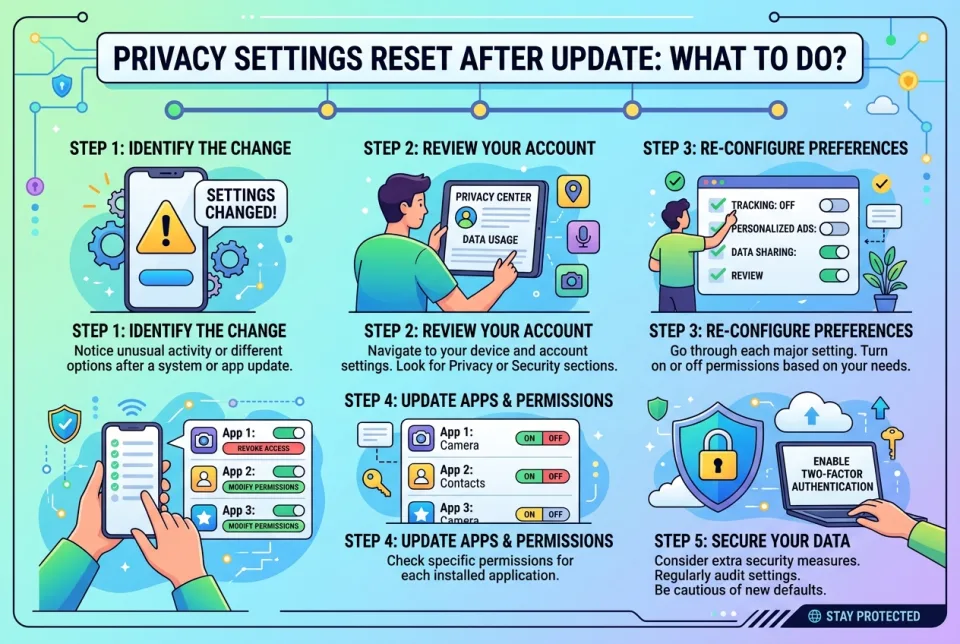
Quick answer
5 steps — read this before anything else
-
1
Do not panic or reinstall anything yet: open the app or device settings and review the privacy and permissions sections first.
-
2
Re-apply the key controls: app permissions, ad tracking or personalization, location sharing, and account visibility.
-
3
Change your account password if you suspect unauthorized access, and turn on two-factor authentication.
-
4
Check for a second account, profile or device signed in that you do not recognize.
-
5
Record what changed so you can spot repeat resets and report them.
Warning
If you notice logins, messages or transactions you did not make, treat the account as compromised: change the password immediately, enable two-factor authentication, and contact the service's official support.
Updates sometimes reset privacy settings to their defaults. This is common after major operating system upgrades, app redesigns, or when an app clears stored preferences during a migration. The result is that permissions you had switched off can quietly switch back on, and data sharing options may be re-enabled without a clear prompt. The fix is usually quick, but you need to know where to look.
What is happening
A settings reset is not usually a sign that you were hacked. It more often means the app changed how it stores preferences, or the update installed a new default configuration. However, a reset can still leave your location, contacts, camera, microphone or advertising profile more exposed than you intended, so treat it as something to correct rather than ignore.
What to do first
- Open the privacy and permissions area. On phones this is usually in Settings under Privacy, Permissions, or per-app settings. On computers, check the browser and the app's own account settings.
- Review app permissions one by one. Turn off access to location, microphone, camera, contacts and photos for any app that does not genuinely need it. Prefer "while using the app" over "always" for location.
- Re-apply account privacy choices. Check who can see your profile, posts or activity, and whether your account is discoverable by phone number or email.
- Turn off ad personalization and tracking if you had it off before. Look for labels such as personalized ads, interest-based ads, or cross-app tracking.
- Check connected devices and sessions. Sign out of sessions and devices you do not recognize, then change your password.
What NOT to do
- Do not assume the reset was malicious and start deleting accounts or wiping devices before you have checked the settings.
- Do not grant broad permissions just to make a prompt go away. Read what is being requested.
- Do not reuse the same password across accounts, especially after a suspected exposure.
- Do not ignore a reset that happens repeatedly. That pattern is worth investigating.
What to monitor
Watch for unexpected login alerts, password reset emails you did not request, unfamiliar devices in your account's active sessions list, or new contacts and messages you did not initiate. Also check whether the app has a privacy dashboard or activity log that shows recent permission use. If you see activity you cannot explain, secure the account first: change the password, enable two-factor authentication, and review recovery email and phone details.
How to prevent it
- Take screenshots of your key privacy settings before a major update so you can compare afterwards.
- Enable two-factor authentication on important accounts so a settings change alone cannot expose them.
- Review permissions monthly, and after any app or system update.
- Keep apps and your operating system updated, but read the release notes for privacy-related changes.
When to get help
Contact the app or device maker's official support if settings will not stay changed, if you cannot find a permission control, or if you see account activity you did not authorize. If you believe your account or personal data has been compromised, report it through the service's official security or privacy channel.
Start with the permissions list on your device today, then work through your account privacy options. Restoring the few controls that matter most takes only a few minutes and closes the gap an update may have opened.
Spotted an error? Report it — we correct factual mistakes promptly.
Read next
Printer shows offline: what to do?
A printer showing offline is usually a simple connection or power issue. Follow these steps to get it back online quickly.
Laptop stolen: what to do?
If your laptop is stolen, act quickly to protect your data and accounts. Here is a step-by-step guide to secure your information and report the theft.
Suspicious charge on credit card: what to do?
A suspicious charge on your credit card can be alarming, but acting quickly can limit the damage. Here is a step-by-step guide to dispute it and protect your account.
Charged again after cancelling a subscription: what to do?
If a company charges you after you cancelled, act quickly: gather proof, contact the company, and if needed dispute the charge with your bank or card issuer.
Related handy tools
Checklists, decision guides, scenarios and quizzes for the same situation.