Printer shows offline: what to do?
A printer showing offline is usually a simple connection or power issue. Follow these steps to get it back online quickly.
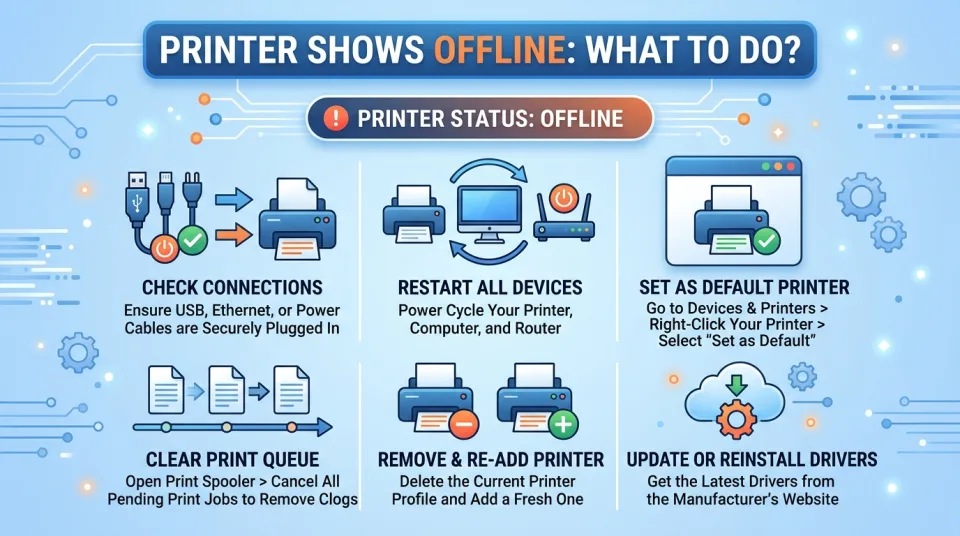
Quick answer
5 steps — read this before anything else
-
1
Check that the printer is powered on and connected to the same network as your computer.
-
2
Restart the printer, your computer, and your router.
-
3
Set the printer as the default printer and clear any stuck print jobs.
-
4
If using USB, try a different port or cable.
-
5
Reinstall the printer driver if the problem persists.
When your printer shows as offline, it means your computer cannot communicate with it. This is often caused by a loose cable, a network hiccup, or a temporary software glitch. Most cases are easy to fix without professional help.
What to do first
- Check the printer's power and connections. Make sure it is turned on and not in sleep mode. If it uses a USB cable, ensure both ends are securely plugged in. If it is a network printer, confirm it is connected to the same Wi-Fi or Ethernet network as your computer.
- Restart everything. Turn off the printer, computer, and router (if using Wi-Fi). Wait 30 seconds, then turn them back on in this order: router, printer, computer. This clears many temporary communication errors.
- Set the printer as default. On your computer, go to Settings > Devices > Printers & scanners (Windows) or System Preferences > Printers & Scanners (Mac). Select your printer and click "Set as default." Also, make sure "Use Printer Offline" is not enabled.
- Clear the print queue. Open the print queue and cancel all pending jobs. Sometimes a stuck job blocks the printer. Restart the print spooler service (Windows) or reset the printing system (Mac) if needed.
- Run the printer troubleshooter. Windows and Mac have built-in tools that can detect and fix common issues. Use them before trying more advanced steps.
If the printer is still offline
- Try a different USB port or cable. A faulty cable or port is a common culprit.
- Check network connectivity. Print a network configuration page from the printer's control panel (if available) to see its IP address. Ensure your computer can ping that address.
- Reinstall the printer driver. Remove the printer from your computer, then download and install the latest driver from the manufacturer's website.
- Disable bidirectional support. In printer properties, under the Ports tab, uncheck "Enable bidirectional support." This can resolve communication issues.
What NOT to do
- Do not repeatedly turn the printer on and off quickly; this can cause damage.
- Do not unplug cables while the printer is printing.
- Do not ignore error messages on the printer's display; they often indicate the root cause.
When to seek professional help
If you have tried all the above and the printer still shows offline, or if you see hardware error codes, contact the printer manufacturer's support or a qualified technician. Do not attempt to open the printer casing unless you are trained, as there may be high-voltage components.
By following these steps, you can usually get your printer back online quickly. Start with the simplest checks and work your way up.
Spotted an error? Report it — we correct factual mistakes promptly.
Read next
What Should I Do If I Lose My Phone?
Losing your phone is stressful, but quick action can protect your data and accounts. Follow these 9 steps to secure your device and personal information.
What to Do If Your Wi-Fi Stops Working: 11 Troubleshooting Tricks to Get Back Online
A practical, step-by-step guide to diagnose and fix common Wi-Fi problems, from router reboots to channel changes and DNS checks, so you can get back online quickly.
What to Do If Your Phone Screen Cracks, 7 Ways to Protect It Until You Get It Fixed
A cracked phone screen is fragile and dangerous to use. Learn immediate steps to stabilize the damage and 7 practical ways to protect it until you can get it repaired.
What Should I Do If My Apps Keep Crashing?
Apps that crash repeatedly are usually fixable with a few simple steps. Try these nine solutions in order, from quick restarts to reinstalling the app.
Related handy tools
Checklists, decision guides, scenarios and quizzes for the same situation.