SIM card swapped without consent: what to do?
A SIM swap is a serious security breach that can give criminals access to your phone number and accounts. Act fast to limit the damage.
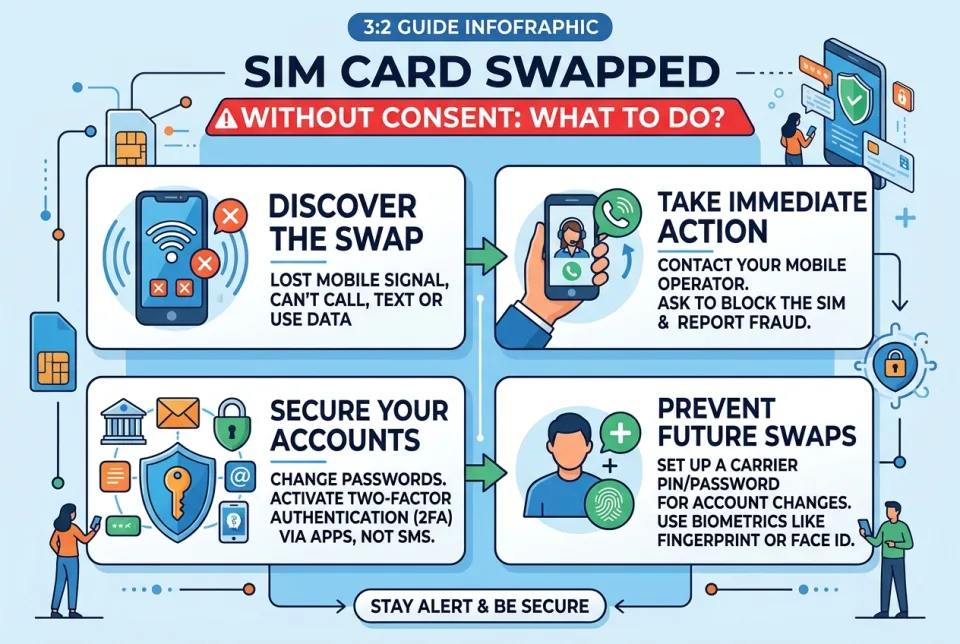
Quick answer
5 steps — read this before anything else
-
1
Contact your mobile carrier immediately to report the unauthorized SIM swap and regain control of your number.
-
2
Change passwords for all important accounts, especially those linked to your phone number.
-
3
Enable two-factor authentication (2FA) using an app or hardware key instead of SMS.
-
4
Monitor your financial accounts and credit reports for suspicious activity.
-
5
File a report with local law enforcement.
Warning
A SIM swap can give criminals access to your bank accounts and personal data. Act immediately to secure your accounts and contact your carrier.
Important — please read
This content is general educational and informational only, and is not a substitute for professional medical advice, diagnosis or treatment. Always seek the advice of a qualified health provider with any questions you may have about a medical condition. Never disregard or delay seeking professional medical care because of something you read here. In an emergency or life-threatening situation, call your local emergency services (police, fire or ambulance) immediately.
A SIM swap happens when someone convinces your mobile carrier to transfer your phone number to a SIM card they control. This allows them to intercept calls and text messages, including two-factor authentication codes, and potentially access your bank accounts, email, and social media. If you suspect your SIM has been swapped without your consent, act quickly to protect your personal information.
What is happening
Your phone number is being used by someone else. You may notice that your phone has no service, you cannot make calls or send texts, or you receive notifications about account changes you did not make. The attacker may have obtained your personal information through phishing, data breaches, or other means to impersonate you to your carrier.
Emergency warning
If you believe your SIM has been swapped, treat it as an emergency. Your financial accounts and personal data are at risk. Contact your mobile carrier and financial institutions immediately. If you notice unauthorized transactions or suspect identity theft, call local emergency services or law enforcement as appropriate.
What to do first
- Contact your mobile carrier immediately. Call their customer service or visit a store in person. Explain that your SIM was swapped without your authorization. Ask them to freeze your number and restore your service. Request a new SIM card and ask about additional security measures, such as a port freeze or account PIN.
- Change passwords for all important accounts. Start with your email, banking, and social media accounts. Use strong, unique passwords and a password manager if possible.
- Enable two-factor authentication (2FA) that does not rely on SMS. Use an authenticator app or a hardware security key instead. If SMS is the only option, consider switching to a more secure method where available.
- Check your financial accounts for unauthorized activity. Review recent transactions and report any fraud to your bank or credit card company immediately. Consider placing a fraud alert or credit freeze with the major credit bureaus.
- Report the incident to law enforcement. File a police report. This can help with insurance claims and identity theft recovery.
What NOT to do
- Do not ignore the warning signs. If your phone suddenly loses service or you receive unexpected notifications, act immediately.
- Do not click on links in suspicious emails or texts. Phishing is a common way attackers gather information for SIM swaps.
- Do not reuse passwords. Using the same password across accounts makes it easier for attackers to access multiple services.
- Do not rely solely on SMS for two-factor authentication. Switch to app-based or hardware-based 2FA for critical accounts.
When to call for help
If you are unable to reach your carrier or if you suspect your identity has been stolen, contact local law enforcement. In the US, you can also file a complaint with the FBI's Internet Crime Complaint Center (IC3). For identity theft, the Federal Trade Commission (FTC) provides resources at IdentityTheft.gov.
What to monitor
- Your phone service and any unusual activity on your account.
- Bank and credit card statements for unauthorized charges.
- Credit reports for new accounts or inquiries you did not initiate.
- Email and social media accounts for password reset emails or messages you did not request.
How to prevent it
- Set up a PIN or passcode with your mobile carrier for account changes.
- Ask your carrier about port freeze or number lock features.
- Use strong, unique passwords and a password manager.
- Enable two-factor authentication that does not rely on SMS where possible.
- Be cautious about sharing personal information online.
After a SIM swap, your priority is to regain control of your number and secure your accounts. Contact your carrier, change passwords, and monitor your accounts closely. For further guidance, refer to the resources below.
This is general information and not a substitute for professional advice. In an emergency, call local emergency services.
Sources & references
Spotted an error? Report it — we correct factual mistakes promptly.
Read next
Privacy settings reset after update: what to do?
When an app or operating system update wipes your privacy settings, your data can become more exposed than you expect. Here is how to check, restore and lock down the most important controls.
Phishing email clicked by mistake: what to do?
Clicking a phishing link can expose your accounts and device. Act quickly to limit damage and secure your information.
Laptop stolen: what to do?
If your laptop is stolen, act quickly to protect your data and accounts. Here is a step-by-step guide to secure your information and report the theft.
Suspicious charge on credit card: what to do?
A suspicious charge on your credit card can be alarming, but acting quickly can limit the damage. Here is a step-by-step guide to dispute it and protect your account.
Related handy tools
Checklists, decision guides, scenarios and quizzes for the same situation.