Smart home hub offline: what to do?
When your smart home hub goes offline, it can disrupt your connected devices. Follow these steps to diagnose and fix the issue safely.
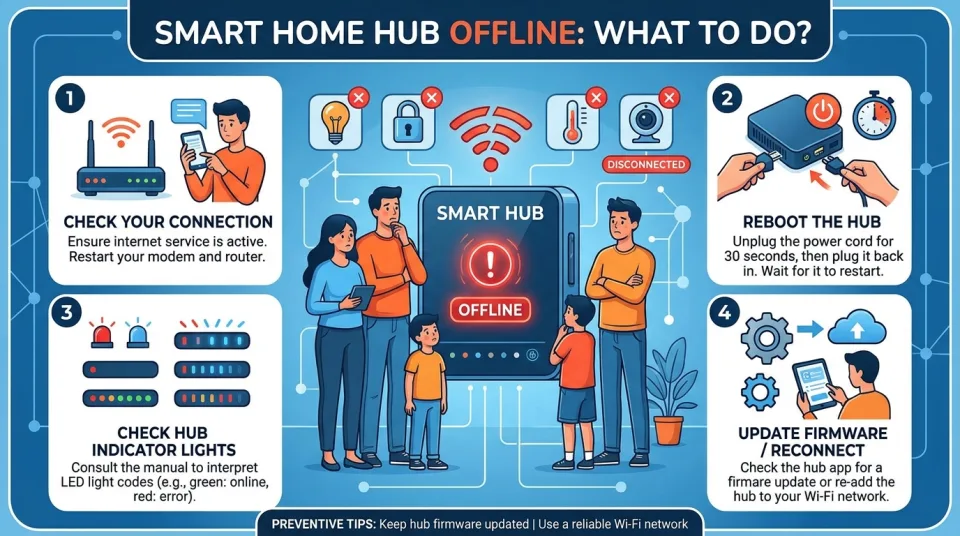
Quick answer
5 steps — read this before anything else
-
1
Check if the hub's power adapter is securely connected and the outlet works.
-
2
Restart your router and modem, then wait for the internet to come back.
-
3
Power cycle the hub by unplugging it for 30 seconds and plugging it back in.
-
4
Open the hub's app to see if it reports a connection error or offers troubleshooting.
-
5
If the hub remains offline, contact the manufacturer's support for further help.
Warning
Do not open the hub's casing or attempt repairs yourself. This can be dangerous and will void your warranty.
A smart home hub is the central device that connects and controls your smart home devices. When it goes offline, you may lose remote control, automation, and voice commands. This guide helps you troubleshoot safely and effectively.
What is happening?
The hub has lost its connection to your home network or the internet. This can be due to a power issue, network problem, or a temporary glitch in the hub or router. Most hubs have indicator lights that show their status: check the manual for what the lights mean.
What to do first
- Check the power. Ensure the hub's power adapter is firmly plugged into both the hub and the wall outlet. Try a different outlet if possible. If the hub has a battery backup, check if it needs charging.
- Check your internet connection. Use your phone or computer to see if other devices can access the internet. If not, restart your router and modem: unplug them, wait 30 seconds, plug them back in, and wait for the lights to stabilize.
- Restart the hub. Unplug the hub's power, wait 30 seconds, then plug it back in. Wait a few minutes for it to boot up and reconnect.
- Check the app. Open the hub's companion app on your phone. It may show a specific error message or offer a troubleshooting guide. Follow any on-screen instructions.
What NOT to do
- Do not repeatedly unplug and plug the hub quickly. This can cause damage. Always wait at least 30 seconds between power cycles.
- Do not reset the hub to factory settings unless instructed by support. You may lose all your settings and device pairings.
- Do not open the hub's casing or attempt repairs yourself. This can be dangerous and will void your warranty.
- Do not ignore overheating. If the hub feels very hot, unplug it and contact the manufacturer.
When to call for help
If the hub still won't come online after these steps, contact the manufacturer's customer support. Have your hub's model and serial number ready. If the hub is under warranty, they may offer a replacement. Also, if you suspect a power surge or electrical issue, consult a qualified electrician.
What to monitor
After the hub is back online, check that all your connected devices are working. Some devices may need to be reconnected. Monitor the hub for a few days to ensure it stays online. If it frequently goes offline, there may be a deeper network issue or a faulty hub.
How to prevent it
- Place your router and hub in a central location, away from metal objects and other electronics that can cause interference.
- Keep your hub's firmware and app updated.
- Consider a battery backup for your router and hub to survive short power outages.
- If your Wi-Fi is weak, consider a mesh network or a Wi-Fi extender.
By following these steps, you can often resolve a hub offline issue quickly. If problems persist, professional support is your best resource.
Spotted an error? Report it — we correct factual mistakes promptly.
Read next
What Should You Do If Your Home Loses Water? 8 Things to Check and Prepare For
A sudden loss of water at home can be alarming. Learn the 8 key checks and preparations to handle it safely and efficiently.
What Should You Do If You Find Mold in Your Home?
Mold needs moisture to grow, so the key is to fix the water source and remove the mold safely. Here are 10 practical steps for dealing with mold and moisture problems.
What Should You Do If Your Home Loses Water?
A sudden loss of water at home can be caused by a burst pipe, a frozen line, a municipal outage, or a problem with your own plumbing. Here is a calm, step-by-step plan to check the right things and protect your home.
What to Do If You Can't Pay Your Rent in Canada
If you cannot pay rent in Canada, take immediate action by contacting your landlord, understanding your provincial tenancy rights, and seeking local financial support.
Related handy tools
Checklists, decision guides, scenarios and quizzes for the same situation.