Screen time eye strain in children: what to do?
Learn how to recognize and reduce digital eye strain in children with practical, evidence-based steps. Know when to seek professional care.
Quick answer
4 steps — read this before anything else
-
1
Follow the 20-20-20 rule: every 20 minutes, look at something 20 feet away for 20 seconds.
-
2
Ensure screens are at a comfortable distance and properly lit, and encourage regular blinking.
-
3
Limit non-educational screen time and encourage outdoor play.
-
4
Watch for signs like rubbing eyes, headaches, or squinting; if they persist, see an eye care professional.
Warning
If your child has sudden vision loss, severe eye pain, or an eye injury, call emergency services immediately.
Important — please read
This content is general educational and informational only, and is not a substitute for professional medical advice, diagnosis or treatment. Always seek the advice of a qualified health provider with any questions you may have about a medical condition. Never disregard or delay seeking professional medical care because of something you read here. In an emergency or life-threatening situation, call your local emergency services (police, fire or ambulance) immediately.
Children today spend hours on screens for school, play, and socializing. This can lead to digital eye strain, also called computer vision syndrome. While it is not a disease, it can cause discomfort and affect learning. This guide explains what to do if your child shows signs of eye strain from screen time.
What is happening?
Digital eye strain happens when eyes get tired from prolonged screen use. Screens can cause reduced blinking, poor posture, and glare, leading to symptoms like dry eyes, blurred vision, headaches, and neck pain. Children may not always complain, so watch for behaviors like rubbing eyes, squinting, or losing interest in tasks.
What to do first
- Take a break: Encourage your child to stop screen use for at least 10-15 minutes and rest their eyes.
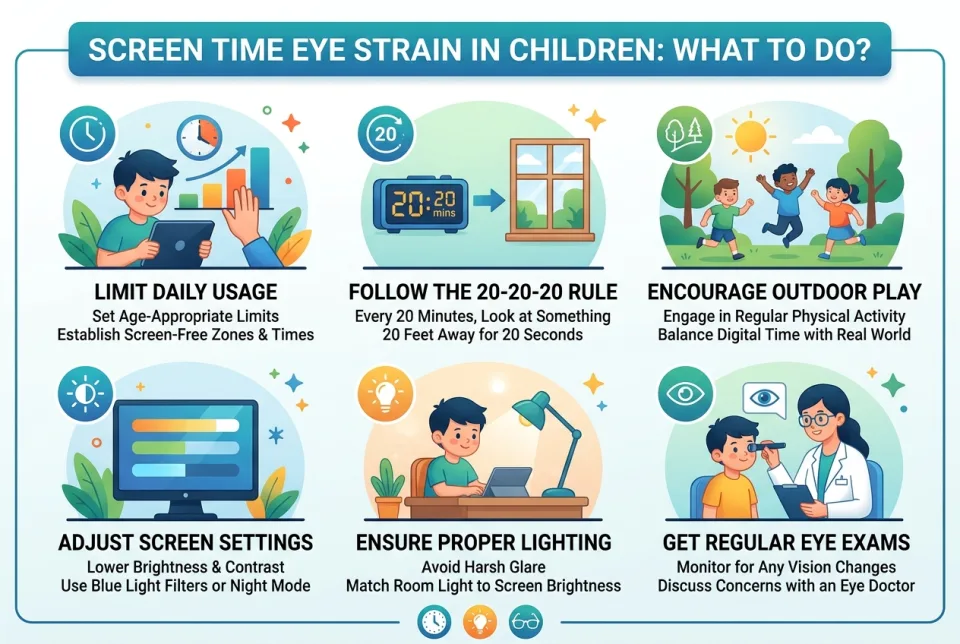
- Apply the 20-20-20 rule: Every 20 minutes, look at something 20 feet away for 20 seconds. Use a timer or app to remind them.
- Check the setup: Ensure the screen is about an arm's length away (for children, adjust to their comfort), positioned slightly below eye level, and free from glare. Adjust brightness to match the room.
- Encourage blinking: Remind your child to blink often to keep eyes moist.
- Use lubricating eye drops if needed: Over-the-counter artificial tears can help dry eyes, but consult a pharmacist or doctor for children.
What NOT to do
- Do not ignore persistent symptoms; they may indicate an underlying vision problem.
- Do not let your child use screens in a dark room; contrast can worsen strain.
- Do not allow screens close to bedtime; the blue light can disrupt sleep.
- Do not rely on blue light filters alone; they do not address all causes of strain.
When to seek professional care
If your child frequently complains of headaches, eye pain, or blurred vision, or if symptoms do not improve with breaks and adjustments, see an eye care professional. Also seek care if you notice squinting, tilting the head, or covering one eye, as these may signal a refractive error. In case of sudden vision loss, severe eye pain, or injury, call emergency services immediately.
What to monitor
Keep track of how often your child rubs their eyes, complains of headaches, or has difficulty focusing. Note the duration of screen time and whether symptoms improve with breaks. This information can help an eye doctor.
How to prevent it
- Set a screen time schedule with frequent breaks.
- Encourage outdoor play; natural light and distance vision help eye health.
- Ensure good lighting and reduce glare on screens.
- Promote good posture with feet flat and back supported.
- Use the 20-20-20 rule as a habit.
By taking these steps, you can help your child use screens comfortably and protect their eye health. If problems persist, consult a professional.
This is general information and not a substitute for professional medical advice. In an emergency, call your local emergency services.
Sources & references
Spotted an error? Report it — we correct factual mistakes promptly.
Read next
Child terrified of the doctor: what to do?
A child's fear of the doctor is common and manageable. Learn practical, evidence-based ways to reduce anxiety before, during, and after a visit.
Nightmares versus night terrors in children
Nightmares and night terrors are different sleep events with different responses. Learn how to tell them apart and what to do safely.
What age can kids stay home alone legally?
There is no single legal age for leaving a child home alone in most places. The law focuses on whether the child is mature enough and the situation is safe.
Child sleepwalking at night: what to do?
Sleepwalking in children is common and usually harmless. Learn how to keep your child safe during an episode and when to talk to a doctor.
Related handy tools
Checklists, decision guides, scenarios and quizzes for the same situation.