Phone storage completely full: what to do?
When your phone storage is full, you can free up space quickly by clearing caches, removing large files, and offloading photos. Learn safe steps to regain storage without losing important data.
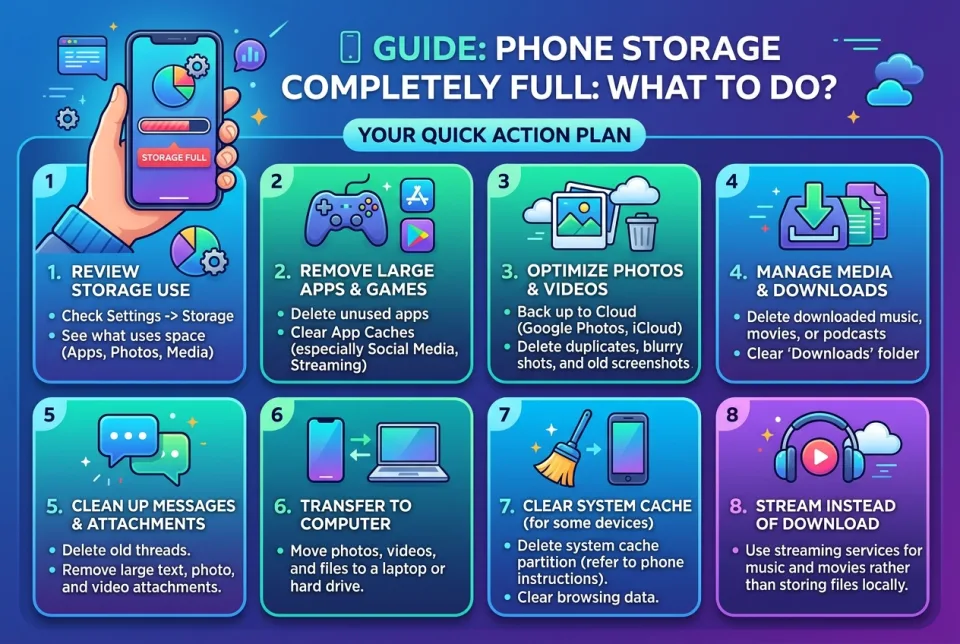
Quick answer
5 steps — read this before anything else
-
1
Check what is using storage in your phone's settings.
-
2
Delete or offload large videos, photos, and unused apps.
-
3
Clear app caches, especially for social media and messaging apps.
-
4
Move files to cloud storage or a computer, then remove them from the phone.
-
5
Restart your phone and verify free space.
When your phone storage is completely full, you may see warnings, apps may crash, and you might be unable to take photos or download updates. The good news is that you can usually free up space without losing important data. This guide walks you through safe, effective steps to reclaim storage.
What is happening
Smartphones have limited internal storage. When it fills up, the operating system lacks space for temporary files, app data, and updates, which can cause slowdowns and errors. Common culprits include photos, videos, messaging app media, cached data, and large apps or games.
What to do first
- Check storage usage. Go to your phone's settings and find the storage section. On iPhone: Settings > General > iPhone Storage. On Android: Settings > Storage. This shows what is taking up space.
- Delete large, unnecessary files. Look for large videos, old downloads, and duplicate photos. Use the file manager or gallery to sort by size.
- Offload photos and videos. Back up to a cloud service or transfer to a computer, then delete from the phone. On iPhone, you can enable Optimize iPhone Storage in iCloud Photos settings.
- Clear app caches. For Android, go to Settings > Apps > [App] > Storage > Clear Cache. On iPhone, you may need to offload the app (Settings > General > iPhone Storage > [App] > Offload App) or reinstall it to clear cache.
- Uninstall unused apps and games. Games often take up several gigabytes. Remove ones you no longer play.
- Restart your phone. This can clear temporary files and free up a small amount of space.
What NOT to do
- Do not delete files randomly without checking what they are; you might remove important documents or memories.
- Do not use untrusted "cleaner" apps that promise to free space; they can be ineffective or contain malware.
- Do not factory reset as a first step; it erases everything and should be a last resort after backing up.
- Do not ignore system warnings about low storage; they can lead to data corruption or app crashes.
When to seek professional help
If you have tried these steps and still cannot free enough space, or if you are unsure how to back up your data safely, consider visiting the manufacturer's support center or a reputable repair shop. They can help you manage storage or transfer data without loss.
How to prevent it
- Regularly review and delete old files and unused apps.
- Enable automatic cloud backup for photos and videos.
- Use streaming services for music and video instead of downloading.
- Keep at least 10-15% of storage free for optimal performance.
By following these steps, you can usually resolve a full storage issue quickly. Start with the storage overview to identify the biggest space hogs, then take action. Remember to back up important data before making major changes.
Spotted an error? Report it — we correct factual mistakes promptly.
Read next
What Should I Do If I Lose My Phone?
Losing your phone is stressful, but quick action can protect your data and accounts. Follow these 9 steps to secure your device and personal information.
What to Do If Your Phone Screen Cracks, 7 Ways to Protect It Until You Get It Fixed
A cracked phone screen is fragile and dangerous to use. Learn immediate steps to stabilize the damage and 7 practical ways to protect it until you can get it repaired.
Bluetooth device refuses to pair: what to do?
When a Bluetooth device won't pair, the fix is usually simple. Follow these steps to get it connected.
Laptop stolen: what to do?
If your laptop is stolen, act quickly to protect your data and accounts. Here is a step-by-step guide to secure your information and report the theft.
Related handy tools
Checklists, decision guides, scenarios and quizzes for the same situation.