Document photocopy strategy for travelers
Learn how to organize and protect copies of your travel documents so you can recover quickly if they are lost or stolen. A simple strategy for paper and digital backups.
Quick answer
4 steps — read this before anything else
-
1
Make two sets of photocopies: one to carry separately from the originals, one to leave with a trusted contact at home.
-
2
Store encrypted digital copies in cloud storage and on your phone for offline access.
-
3
Keep the originals in a secure place, such as a money belt or hotel safe, and carry only what you need.
-
4
If documents are lost or stolen, report to local police and contact your embassy or consulate immediately.
Warning
If your passport or identity documents are lost or stolen, report it to local police and your embassy or consulate immediately. Do not wait until you are due to travel.
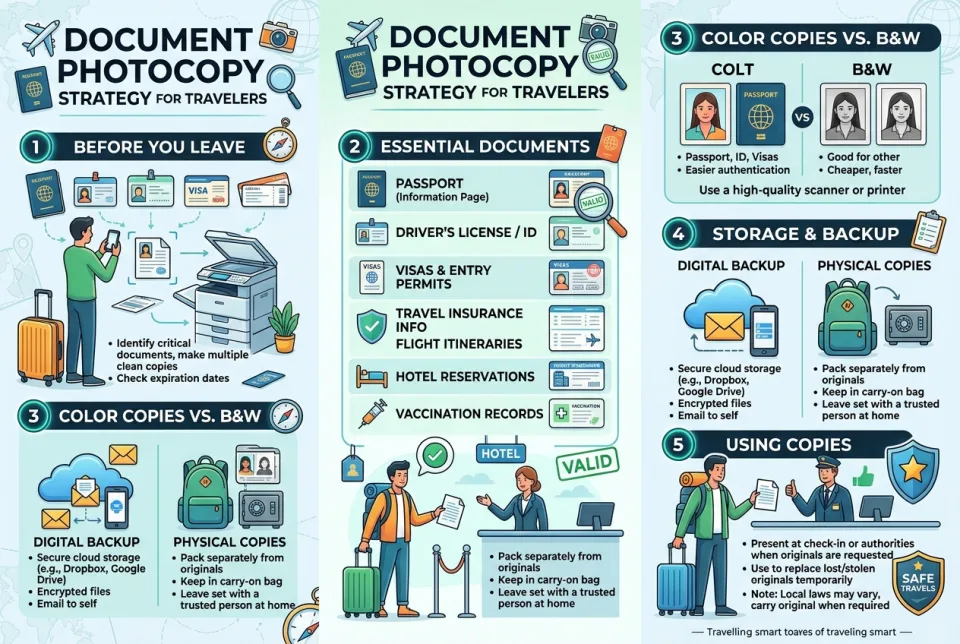
Losing a passport, ID, or travel ticket can derail a trip. A simple document photocopy strategy helps you prove your identity, speed up replacements, and stay in control if something goes missing. The goal is to have the right copies in the right places, without carrying unnecessary risk.
What to copy and how many sets
Photocopy or scan the photo page of your passport, your visa pages, your driver's license or state ID, your travel insurance policy (if you have one), and your itinerary or tickets. Credit cards and bank cards should be recorded separately, not photocopied in full; note the card issuer and the last four digits only. Make two paper sets and one digital set.
Where to keep each set
- Set 1: with you, but separate from the originals. Keep this in a different bag or pocket from your passport and wallet. If one bag is lost or stolen, you still have a backup.
- Set 2: with a trusted contact at home. Leave it with a family member or friend who can send you copies by email or messaging app if needed.
- Digital set: encrypted and accessible offline. Store scans in a password-protected cloud folder and also save them to your phone for offline access. Use a strong password and enable two-factor authentication on your cloud account.
Step by step: build your backup kit before you go
- Gather the documents listed above and make clear, legible photocopies or scans.
- Label each set with your name and a contact phone number, in case a set is found.
- Place Set 1 in a sealed plastic bag to protect it from water, and pack it separately from your passport.
- Give Set 2 to your trusted contact and explain how to reach you in an emergency.
- Upload the digital set to your cloud storage, then download it to your phone for offline use.
- Check that you can open the digital files without an internet connection before you leave.
What NOT to do
- Do not carry all your original documents and all copies in the same bag or pocket.
- Do not email unencrypted scans to yourself or others; use a password-protected file or a secure cloud link.
- Do not leave copies visible in a hotel room or rental car.
- Do not photograph credit cards or passwords and store them in your phone's regular photo gallery.
- Do not rely on a single digital copy that requires internet access to open.
If your documents are lost or stolen
Report the loss or theft to local police and get a written report if possible. Contact your embassy or consulate for guidance on replacement travel documents. Use your backup copies to provide the details they request. If payment cards are involved, contact your card issuer right away to block them. Keep a record of what you reported and to whom.
How to prevent problems
- Use a hotel safe for originals you do not need that day, and carry only the copy you need.
- Keep digital copies current; update them after any document renewal.
- Store your phone and cloud account with a strong passcode and two-factor authentication.
- Check your backup kit before every trip to make sure nothing is missing.
Take a few minutes before you travel to prepare your copies and store them in separate places. That small effort can save you hours of stress if something goes wrong.
Spotted an error? Report it — we correct factual mistakes promptly.
Read next
What to Do If You Miss Your Flight
Missing a flight is stressful, but taking quick action increases your chances of getting rebooked promptly while protecting the rest of your travel itinerary.
Eating in Morocco: avoiding traveler's diarrhea
Traveler's diarrhea is a common risk when eating in Morocco. Learn safe food and water practices to reduce your chances of getting sick.
Vacation rental turned out to be a scam: what to do?
If you arrive at a vacation rental that does not exist or was misrepresented, act quickly to protect your money and find safe lodging. Here is a step-by-step guide to reporting the scam and recovering what you can.
Beating jet lag quickly: what actually works?
Jet lag is a temporary sleep disorder caused by rapid travel across time zones. Learn evidence-based strategies to adjust your body clock faster and reduce symptoms.
Related handy tools
Checklists, decision guides, scenarios and quizzes for the same situation.