Deleted photos from the phone: can I recover them?
Deleted photos may still be recoverable if you act quickly and stop using the phone. Learn the safe steps to check backups, recently deleted folders, and cloud services before overwriting data.
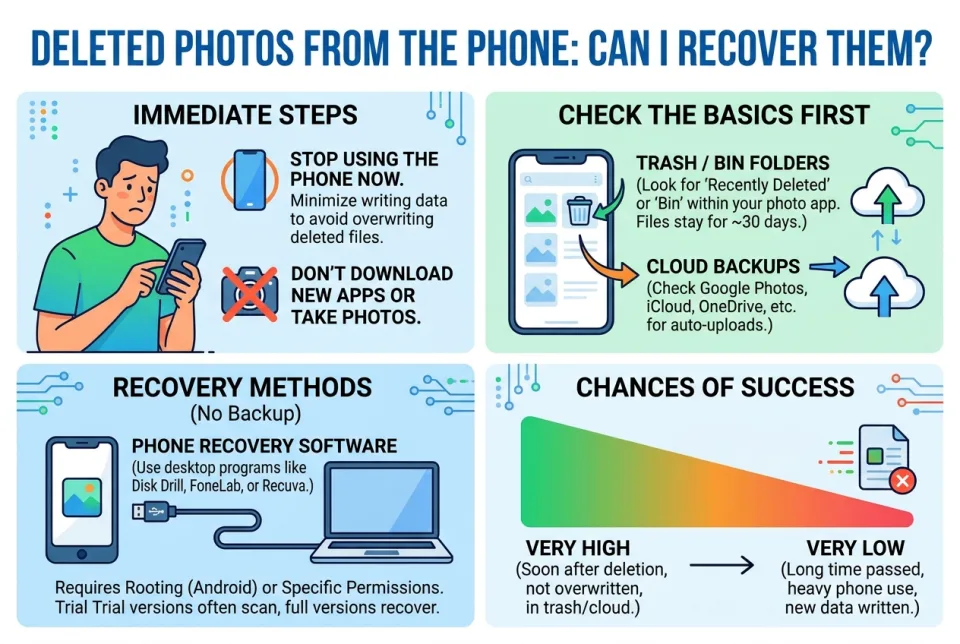
Quick answer
5 steps — read this before anything else
-
1
Stop taking new photos or installing apps to avoid overwriting deleted data.
-
2
Check your phone's 'Recently Deleted' album or trash folder first.
-
3
Look for automatic backups in Google Photos, iCloud, or other cloud services.
-
4
If needed, use reputable recovery software on a computer, not on the phone itself.
-
5
For critical photos, consider professional data recovery services.
Warning
Stop using the phone immediately to avoid overwriting deleted photos. Do not install recovery apps on the phone itself.
Accidentally deleting photos from your phone is stressful, but recovery is often possible if you act fast. The key is to avoid overwriting the deleted data and to check all available backup sources before trying recovery tools.
What is happening
When you delete a photo, the file is not immediately erased. The phone marks the storage space as available for new data. Until that space is overwritten, the photo may still be recoverable. However, continued use of the phone (taking new photos, installing apps, receiving messages) can overwrite the data, making recovery impossible.
What to do first
- Stop using the phone for photos and apps. Put it in airplane mode if possible to prevent syncing and new data.
- Check the 'Recently Deleted' album. On iPhone, go to Photos > Albums > Recently Deleted. On Android, check Google Photos > Library > Trash. Items are usually kept for 30 days.
- Check cloud backups. Open Google Photos, iCloud Photos, or any other backup service you use. Look for deleted items in their trash or recently deleted sections. Also check if photos were synced to a computer or another device.
- Look for local backups. If you back up to a computer (iTunes/Finder on iPhone, or a computer folder on Android), check those backups for the missing photos.
What NOT to do
- Do not take new photos or videos. This is the fastest way to overwrite deleted data.
- Do not install recovery apps directly on the phone. Installation writes data to the phone and may reduce recovery chances.
- Do not factory reset the phone unless advised by a professional, as it can erase everything permanently.
- Do not use untrusted recovery software that promises miracles; some can be scams or contain malware.
When to seek professional help
If the photos are irreplaceable (e.g., family memories, important documents) and backups and trash folders are empty, consider a professional data recovery service. These services can sometimes recover data from phone storage, but they can be expensive and success is not guaranteed. For most users, checking backups and trash folders is sufficient.
How to prevent future loss
- Enable automatic cloud backup for your photos (e.g., Google Photos, iCloud).
- Regularly back up to a computer as a second copy.
- Be cautious when deleting and empty trash only after confirming you don't need the items.
Remember: the sooner you stop using the phone and check backups, the better your chances. If you cannot recover the photos yourself, professional help may be the next step.
Spotted an error? Report it — we correct factual mistakes promptly.
Read next
What Should I Do If I Lose My Phone?
Losing your phone is stressful, but quick action can protect your data and accounts. Follow these 9 steps to secure your device and personal information.
What to Do If Your Phone Screen Cracks, 7 Ways to Protect It Until You Get It Fixed
A cracked phone screen is fragile and dangerous to use. Learn immediate steps to stabilize the damage and 7 practical ways to protect it until you can get it repaired.
Bluetooth device refuses to pair: what to do?
When a Bluetooth device won't pair, the fix is usually simple. Follow these steps to get it connected.
Laptop stolen: what to do?
If your laptop is stolen, act quickly to protect your data and accounts. Here is a step-by-step guide to secure your information and report the theft.
Related handy tools
Checklists, decision guides, scenarios and quizzes for the same situation.