My email account is sending spam: what to do?
If your email account is sending spam, your credentials may be compromised. Act quickly to secure your account and stop the spam.
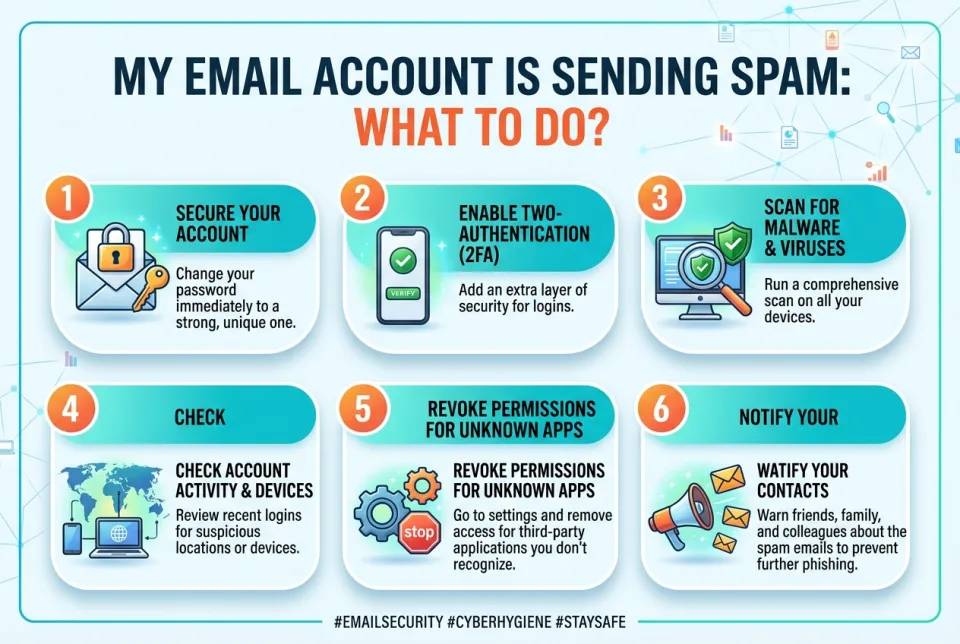
Quick answer
5 steps — read this before anything else
-
1
Change your password immediately from a trusted device.
-
2
Enable two-factor authentication (2FA) if available.
-
3
Check for and remove any suspicious forwarding rules or filters.
-
4
Review sent items and deleted items for unauthorized activity.
-
5
Run a full antivirus scan on your devices.
Warning
If you suspect your account is compromised, change your password immediately and enable two-factor authentication. Do not click on links in suspicious emails.
Discovering that your email account is sending spam can be alarming. It often means someone else has gained access to your account, or your device is infected with malware. Taking swift action can help you regain control and protect your contacts.
What is happening?
Spam being sent from your email address usually indicates one of two things: your account credentials have been compromised (e.g., through phishing or a data breach), or malware on your device is using your email client to send messages. In some cases, spammers spoof your address without accessing your account, but if you see messages in your Sent folder, your account is likely compromised.
Step by step: what to do first
- Change your password immediately. Use a strong, unique password that you haven't used elsewhere. Do this from a device you trust.
- Enable two-factor authentication (2FA). This adds an extra layer of security. Check your email provider's security settings for this option.
- Check for forwarding rules and filters. Attackers often set up rules to forward your emails to themselves or to hide spam. Remove any you don't recognize.
- Review sent and deleted items. Look for messages you didn't send. Also check your account's login history for unfamiliar devices or locations.
- Run a full antivirus scan. Use reputable security software to scan all devices that access your email.
- Notify your contacts. Warn them not to click links or open attachments from your account during this time.
What NOT to do
- Don't ignore the issue: spam can escalate to identity theft or further compromise.
- Don't reuse old passwords or use the same password across multiple accounts.
- Don't click on links or attachments in the spam messages, even if they appear to come from you.
- Don't respond to the spam or attempt to unsubscribe from suspicious emails.
When to seek professional help
If you cannot regain control of your account, or if sensitive information (like banking details) may have been exposed, contact your email provider's support and consider reporting the incident to your local cybercrime authority. If you suspect malware that antivirus software cannot remove, seek help from a professional technician.
How to prevent it
- Use strong, unique passwords and a password manager.
- Enable 2FA on all important accounts.
- Be cautious of phishing emails: verify sender addresses and avoid clicking suspicious links.
- Keep your devices and software updated.
- Regularly review your account's security settings and login activity.
By acting quickly, you can secure your account and minimize the impact. Stay vigilant and monitor your account for any unusual activity in the coming weeks.
Spotted an error? Report it — we correct factual mistakes promptly.
Read next
What Should I Do If I Lose My Phone?
Losing your phone is stressful, but quick action can protect your data and accounts. Follow these 9 steps to secure your device and personal information.
What to Do If Your Wi-Fi Stops Working: 11 Troubleshooting Tricks to Get Back Online
A practical, step-by-step guide to diagnose and fix common Wi-Fi problems, from router reboots to channel changes and DNS checks, so you can get back online quickly.
What to Do If Your Phone Screen Cracks, 7 Ways to Protect It Until You Get It Fixed
A cracked phone screen is fragile and dangerous to use. Learn immediate steps to stabilize the damage and 7 practical ways to protect it until you can get it repaired.
What Should I Do If My Apps Keep Crashing?
Apps that crash repeatedly are usually fixable with a few simple steps. Try these nine solutions in order, from quick restarts to reinstalling the app.
Related handy tools
Checklists, decision guides, scenarios and quizzes for the same situation.